Carrd free plan features and limits
Carrd’s free plan, called Basic, includes three site slots, up to 50 elements per site, free templates and publishing on a .carrd.co address with HTTPS. You can build a responsive profile, portfolio or landing page with text, images and links. Carrd branding stays on the page.Custom domains, built-in forms and custom code require a suitable paid plan. This guide shows what you can actually do for free, with screenshots from the Basic editor and examples for each important limit.
Features checked in Carrd’s Basic editor on 27 September 2026.
Independent guide. We may earn a commission through the Carrd links on this page.
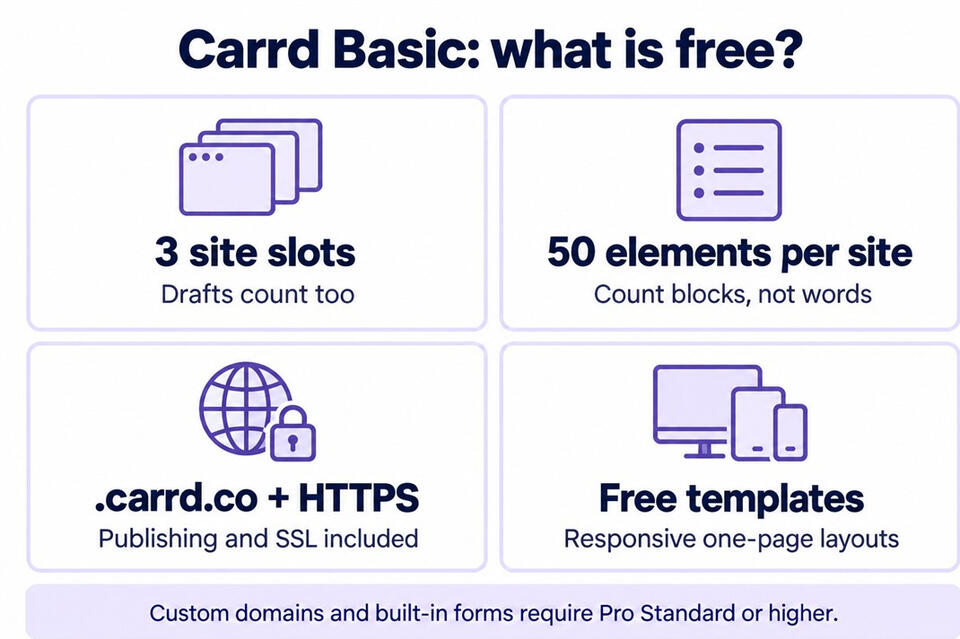
What does Carrd’s free plan include?
The free editor gives you the building blocks for a complete one-page website. In our Basic account, the Add menu includes text, images, video, audio, galleries, timers, lists, buttons, links, icons, tables, dividers, containers and controls. Locked items are marked separately.You can arrange the blocks visually, change their appearance and preview the mobile layout. For a useful first page, start with a clear heading, a short introduction, a few images and one obvious next step.Links are useful without a form. A button can open a website, launch an email app or start a phone call on a supported device. For example, “Email me” can use a mailto: link, while “View my work” can open a project hosted elsewhere. See Carrd’s supported URL types.Hosted video and audio are supported. The native Video element can display services such as YouTube or Vimeo. Audio has supported services including SoundCloud. This differs from pasting arbitrary HTML into the paid Embed element. Uploading your own video file requires Pro Lite or higher. Video guide · Audio guide
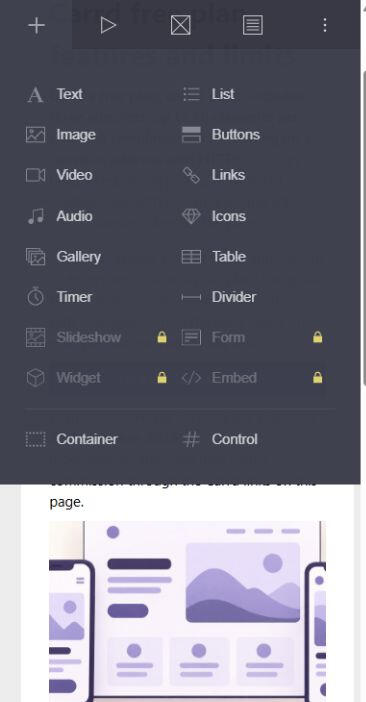
The Basic editor marks paid tools with a lock. Text, images, buttons and native media elements are available; Form and Embed are locked.
Three site slots, including drafts
Basic includes three site slots per account. Published sites, saved drafts, templates and archived sites count toward that total; sites in the Trash do not. For example, one published portfolio and two saved drafts already use all three slots. You do not get three published sites plus unlimited drafts. How site slots work
Up to 50 elements per site
An element is a building block added in the editor, such as a text block, image or button. The limit counts blocks, not words. A heading, a paragraph and a button added as separate elements use three blocks.Plan the main sections before adding decorative pieces. You can put several paragraphs in one text element, while keeping section headings separate for a clear structure. Open More Actions → Elements to check your count. Carrd’s building troubleshooting guide confirms the 50-element Basic limit.
Free hosting, HTTPS and a .carrd.co address
You can publish on a name ending in .carrd.co, subject to availability, without buying separate hosting. Carrd automatically enables HTTPS for these addresses. This gives you a secure link to share on a résumé, a social profile or a message. Carrd’s SSL guideEnter your preferred name in Carrd’s publishing form and check the availability message. An empty public address does not prove that a name is available. Connecting a domain you own, such as yourname.com, requires Pro Standard or higher.
Are there free Carrd templates?
Yes. Carrd offers free templates as well as premium designs reserved for Pro. You can also start from a blank page. Check the Pro label in the template picker before choosing a design if you want to stay on Basic. Browse Carrd’s starting optionsChoose a layout for the content you have. A profile needs a short introduction and a few useful links. A portfolio needs room for work samples and captions. Once you choose a template, you can replace its text and images, adjust its appearance and check the mobile view. The same Basic limits apply to your finished site.
Is Carrd free for a portfolio or landing page?
A small portfolio works well on Basic. Start with your name, a short introduction, three selected projects and a contact link. Each project can show an image, explain what you contributed and link to the full work elsewhere. Specific captions help a visitor understand what they are looking at.A free landing page can have one clear next step. Explain an event and link to its registration service, introduce a product and link to its store, or invite visitors to email you about a service. A button that opens another website is a normal link. A signup form or checkout displayed inside your Carrd page is a different feature. Check the external service’s own pricing too.
Can a free Carrd site have multiple pages?
Carrd is designed for one-page sites, but its Sections feature can organize content into page-like views. You could separate an introduction, work samples and contact details, then connect them with buttons. These remain sections within one Carrd site and share its 50-element allowance.Section links use a hash, such as #contact. This is useful navigation, but it is not the same as creating separate pages with their own URLs and SEO titles. See Carrd’s guide to sections and section setup instructions.
What are the main limitations of Carrd Basic?
Custom domains: require Pro Standard or higher. Pro Lite does not unlock them, and domain registration is separate. Custom domain requirementsBuilt-in contact and signup forms: require Pro Standard or higher. On Basic, an email button can open the visitor’s email app, or an ordinary link can lead to a form hosted elsewhere. Neither option is a native form on your Carrd page. Contact form guideCustom HTML, JavaScript and embedded widgets: require Pro Standard or higher. Native supported video and audio elements still work on Basic. Custom code requirementsBranding and presentation: Basic keeps the Carrd footer branding. Removing it, using a custom favicon, accessing premium templates and removing the element limit require Pro Lite or higher. Analytics integrations require Pro Standard or higher.These limits matter when you need a specific workflow. If visitors only need to read your work and follow a link, Basic may already cover the whole job.
Carrd free vs Pro Lite and Pro Standard
Basic — free
3 site slots · 50 elements per site · .carrd.co publishing · Carrd branding remains. Best suited to a simple profile, portfolio or page that sends visitors to another destination.Pro Lite — from $9 per year
3 site slots · unlimited elements · branding removal · premium templates · custom favicons. Useful for improving presentation when you can keep a Carrd address. Custom domains and built-in forms are not included.Pro Standard — from $19 per year
10 site slots · Lite features · custom domains · built-in forms · custom code and widgets · analytics integrations. Relevant when you need your own domain or want visitors to submit a form on the page.These are the entry-level plan prices and allowances checked on 27 September 2026. See the official plan comparison for current options. Start with the features your page needs; a paid plan is not necessary just to publish a simple site.
Is the free plan the same as the Carrd Pro trial?
No. Basic is the free plan; the Pro trial is separate. The trial lasts seven days and lets you try a selection of paid features without entering payment or credit card details. It has a 150-element limit, so a trial editor does not show the same limits as Basic.If a feature is available during the trial, check which paid plan includes it before building your site around it. Access during a trial does not make that feature part of Basic. Carrd explains the scope in its Pro trial guide and Pro troubleshooting notes.
How to publish a Carrd site for free
1. Choose a free template or a blank page. Look for Pro labels before selecting your starting design.2. Add your text, images and links. Keep the site within 50 elements and use features included in Basic.3. Check the mobile view. Read the page on a narrow screen and check that button labels, images and paragraphs fit comfortably.4. Open Publish. Enter a clear page title and a short description of what visitors will find.5. Select “Publish to a .carrd.co URL”. Enter a name and wait for the availability result. Complete any account steps Carrd presents.6. Publish and test the public page. Open its address, tap every button and check that each link reaches the right destination.You can update the title and description later in the same panel. See Carrd’s title and description guide.
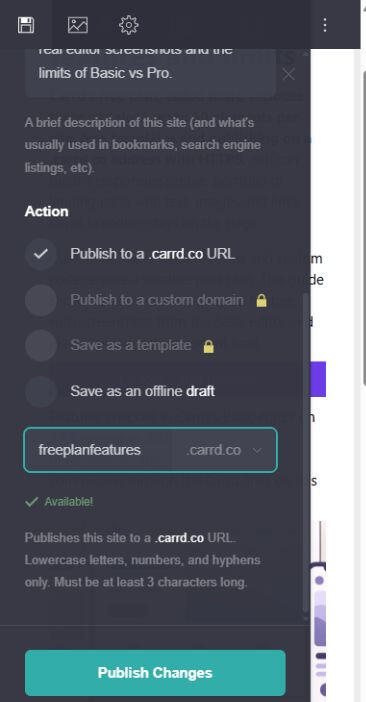
In the Basic publishing panel, the .carrd.co option is available and custom-domain publishing is locked. Enter a name and check the availability message before publishing.
Does Carrd Basic include any SEO features?
You can set a page title and description on Basic. Give the page a specific title, organize the content with meaningful headings and use descriptive alternate text for useful images. Carrd also generates a sitemap for every site, available at its address followed by /sitemap.xml. Sitemap documentationThese are useful foundations, but they do not guarantee that Google will index or rank the page. A free Carrd address can host helpful content; answer the visitor’s question clearly and check the reading experience on a phone. Advanced custom meta tags and built-in analytics integrations belong to Pro Standard or higher.
Start with the features you need
For a profile, small portfolio, link-in-bio page or straightforward landing page, Basic is a practical starting point. Build the smallest useful version, publish it and see whether a real limitation gets in the way.Need only more elements or branding removal? Look at Lite. Need your own domain, native forms or custom code? Compare Standard. The right choice depends on what your visitors need to do.Explore Carrd’s builder and current optionsReferral code: WZ92JF8H
Our link identifies this referral code. You do not need it to use Basic. We have not confirmed a customer discount, so check any offer and the final price shown by Carrd before buying Pro. We may earn a commission if you purchase through our link.